Sessions#
A Session is one agent or shell running in tmux on your computer. Mewla
starts it, lists it and lets you read or drive it from the phone. Because it is
plain tmux, the same Session is there when you sit down at the desk.
Start a Session#
In Sessions, tap the New session pill (or ⋯ > New session), pick a directory and tap what to run:
| Choice | Runs |
|---|---|
| Claude, Codex, Cursor, Grok, Pi, OpenCode | That agent CLI, using the command from Agents and models |
| Shell | Your login shell |
| DSH | The DSH harness, opened as a web page rather than a terminal |
Advanced lets you set the working directory, any command (for example
claude --permission-mode auto) and a window title.
The agent must already be installed and signed in on the computer; Mewla never signs in for you.
The list#
Sessions are grouped by directory. Each row shows the agent, the Session's name, its latest line and, on the right, its state mark: a spinning arc while it works, a red dot when it needs you, a crossed box when it failed, a check when it finished.
Brain's Workers are ordinary Sessions and appear here too. Long-press a row to select several and terminate them together.
Chat, Terminal and Git#
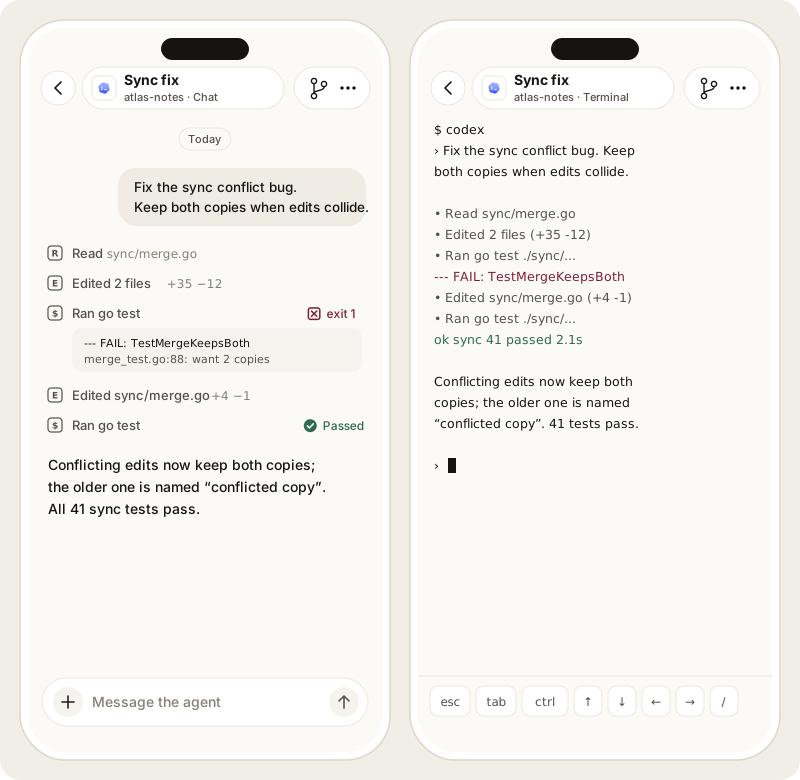
Open a Session to read it in one of three ways:
- Chat: the structured conversation, with your messages, the agent's replies, tool calls, plans and attachments. Available for Claude, Codex, Cursor, Grok, Pi and OpenCode.
- Terminal: the live terminal, rendered natively. Works for any command, including a Shell. A key row above the keyboard adds Ctrl, Esc, Tab and arrows.
- Git: read-only All, Working and Staged diffs for the Session's repository. Reading a diff never stages or discards anything.
What you type in either Chat or Terminal goes to the same tmux pane.
When Claude asks you to choose#
When Claude asks a question with options (AskUserQuestion), Chat shows a Waiting for your choice card above the composer. The card shows each question and its options. Pick one option, or several where the question allows it, or type your own answer in Other. Then tap Send answer.
Mewla reads the questions from Claude's transcript, not from the screen. It selects your answer in the live terminal and checks the screen before every key. If the prompt has changed, or was partly answered in the Terminal, Mewla stops and says so, and nothing is submitted. You can always finish in the Terminal. Once the question is answered, from the card or from the Terminal, the card becomes an Answered line in the chat.
Claude's permission and plan-approval prompts also show as Waiting for your choice, with Claude's own options. Answer those in the Terminal.
Files in a reply#
Tap a file path in a reply, a tool row or a changed-files list to open it without leaving the chat: Markdown and text are shown as text, images can be zoomed, and PDFs open on the phone. Video (mp4, m4v, mov, webm) and audio (mp3, m4a, wav, ogg, opus, flac) play right there with play/pause, a scrubber you can drag to seek, the time, mute and, for video, full screen. Playback streams from the computer, so a long recording starts at once and seeking does not download the whole file. Download and Copy path sit in the header as for any file.
A file that is not really what its name says (an .mp4 that is not an MP4
container, say) is not played. A codec the device can't decode, such as HEVC
in some browsers, shows "can't be played here"; download it instead.
A Session's ⋯ menu holds:
| Item | Does |
|---|---|
| Open terminal / Open chat | Switch between the two views |
| New Terminal | Start a Shell in the same directory |
| Rename | Change the Session's name |
| Model | Pick the model for this Session only |
| Open Web | Open a DSH Session's web page |
| Open Brain | Jump to the Brain conversation about this Worker's Work |
| Terminate | Stop the Session, after you confirm |
Items appear only where they apply: Open Web for DSH, Open Brain for a Worker.
Services#
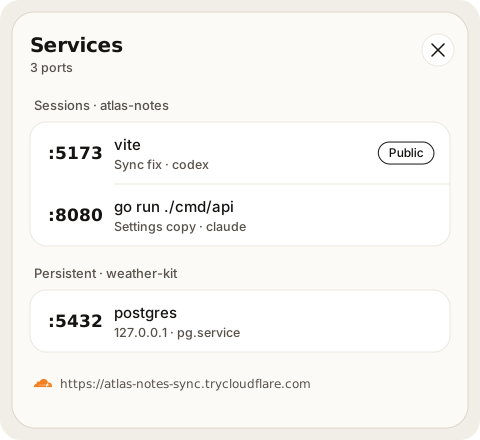
Agents start dev servers, previews and APIs. Services, in the Sessions ⋯ menu, lists the ports they listen on, by project:
| Source | Shown when |
|---|---|
| Session | A process inside a live Session listens on a port. The row opens that Session's terminal. |
| Persistent | A registered user systemd unit is running and listening. It has no terminal. |
A service bound only to 127.0.0.1 is marked local; Mewla does not invent a
network URL for it. A registered unit that stopped shows Inactive; one
whose state cannot be read shows Error with the reason.
Keep a service after its Session ends#
A service started outside tmux, such as a user systemd unit, stays hidden
until you register it. Registering never starts, stops or changes the unit:
mewla service register -unit my-preview.service -name "Docs preview" \
  -project docs -port 3080 -cwd ~/projects/docs
mewla service list --json
mewla service unregister -unit my-preview.service   # removes the registration only
Only plain user unit names are accepted. Registrations survive daemon restarts
and Worker cleanup, and Mewla checks on every refresh that the unit is running
and owns the port. This needs Linux with a user systemd.
Share one with a temporary public URL#
A service row can start a Cloudflare Quick Tunnel: a random
trycloudflare.com URL for that one service. It needs cloudflared on the
computer, but no Cloudflare account.
- Anyone with the URL can reach the service. Do not tunnel anything that holds secrets or has no login of its own.
- Mewla starts a tunnel only when you tap it, and first checks that the service answers HTTP.
- The tunnel follows the process that owns the port: if it exits, the tunnel stops. Stopping a tunnel never stops the service.
- URLs live in memory only. After a daemon restart there is no tunnel until you start one again.
- Cloudflare limits Quick Tunnels to 200 concurrent requests and does not support Server-Sent Events.
Mewla runs cloudflared with an empty configuration and never touches your own
named tunnels or ~/.cloudflared. Quick Tunnels need a Linux daemon.
From the computer, with the ID and generation from mewla service list --json:
mewla service tunnel start  -id SERVICE_ID -generation PROCESS_GENERATION
mewla service tunnel status -id SERVICE_ID -generation PROCESS_GENERATION
mewla service tunnel stop   -id SERVICE_ID -generation PROCESS_GENERATION