Calendar#
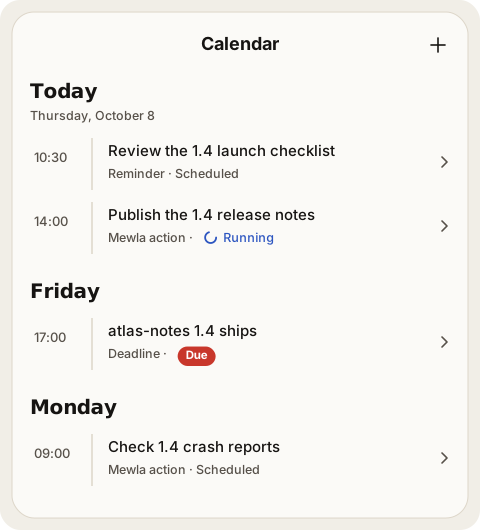
Calendar is Mewla's view of time: what happens when. Open it from the menu (☰, or the sidebar on a wide screen). It lives on the daemon and syncs to the app, so it belongs to the current server like everything else.
Item kinds#
| Kind | Has | What happens when it is due |
|---|---|---|
| Event | A start and an end | Shows as running during the interval, then completes |
| Reminder | A notify time | Your phone shows a notification and the item waits for you |
| Deadline | A due time | The item waits for you |
| Scheduled action | A due time and an instruction | An agent runs the instruction as Work and reports back to Brain |
In the app, an item that waits for you shows the red Needs you mark; running, done, failed and cancelled items use the same marks as Work, and a failed item explains why.
You enter a local date, a local time and a timezone. Items can repeat daily, weekly or on weekdays, and keep their local time across daylight-saving changes. A time that does not exist on a daylight-saving day is rejected; a time that occurs twice asks you to choose the first or second occurrence.
Scheduled actions#
A scheduled action is a small job for an agent: "At 09:30 on weekdays, summarise yesterday's merged pull requests." When it is due, Mewla:
- creates a visible Work item and starts the agent in its own Session, on Brain's executor;
- waits for that Work to finish or fail;
- posts the result to the Brain thread where you created the action, and sends one push notification that opens that thread.
Each occurrence runs at most once, even across daemon restarts. A recurring action moves on to its next time after a success or a failure, and the failed run stays in its history. If the daemon was down when an action was due, it runs on startup only if it is at most 15 minutes late; older ones are marked failed so stale work does not start unexpectedly. Use Run now to run one on demand.
Scheduled actions run unattended; see Permission bypass risks.
Reminders on your phone#
After a sync, the app schedules the next reminder as a local notification, so it still fires if the phone loses its connection to the daemon. If you deny notification permission, Calendar keeps working and tells you notifications are off.
Ask Brain or use the CLI#
Brain creates calendar items when you ask for one explicitly ("remind me tomorrow at 9"). It does not pull commitments out of every message.
From the computer:
mewla calendar list --json
mewla calendar get -id <item-id> --json
mewla calendar create -title "Review plan" -kind reminder \
  -date 2026-07-15 -time 09:30 -timezone Europe/Berlin --json
mewla calendar create -title "Summarise merged PRs" -kind scheduled_action \
  -date 2026-07-15 -time 09:30 -timezone Europe/Berlin -recurrence weekdays \
  -instruction "Summarise yesterday's merged pull requests" \
  -source-thread <brain-thread-id> --json
mewla calendar cancel -id <item-id> -revision <revision> --json
mewla calendar run -id <item-id> --json
A scheduled action needs -source-thread, the Brain thread that receives its
result. Events use -end-date and -end-time. mewla calendar update takes the
complete item as -item-json plus its current -revision, so two edits cannot
silently overwrite each other.
Limits#
Calendar does not sync with Apple or Google calendars, and has no attendees, shared calendars or automatic scheduling.