Notifications and Telegram#
Mewla interrupts you only when an agent needs you or finished while you were away. It is not a progress feed.
Push notifications#
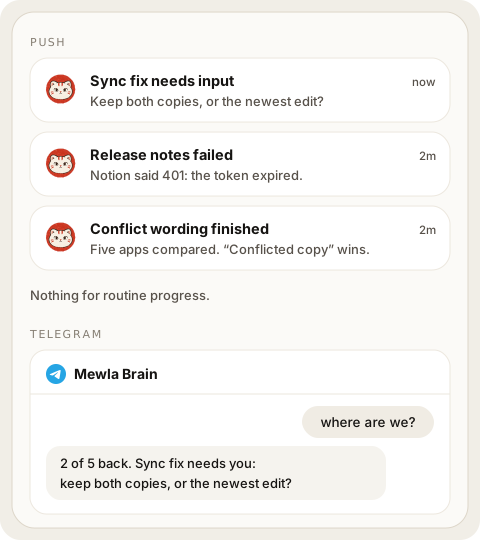
The daemon sends a push for three agent states:
| State | Title | Priority |
|---|---|---|
| Needs input | <name> needs input |
High |
| Failed | <name> failed |
High |
| Finished | <name> finished |
Default |
The name is the Session's alias or project, not a raw tmux name. "Finished"
means the Session ended, not that the task succeeded; open it to check.
Mewla stays silent while an agent is running, while its state is unknown, and for connection changes.
If you are looking at that exact Session in the app, Mewla does not notify you. Anywhere else, including another Session or with the app in the background, it sends the push.
Calendar sends two other kinds of alert:
- Reminders are scheduled on the phone itself, so they fire without a connection to the daemon.
- A scheduled action sends one push when its result is ready, which opens the Brain thread that holds the result. The alert never contains the result itself.
Each push is a single attempt. If delivery fails or the daemon restarts at the wrong moment, there may be no alert, but the state and results are still there when you open the app.
Push delivery in your own builds of the app needs your own Expo project; Mewla works without push.
Telegram#
Telegram is a second way to talk to the current server's Brain and Workers. It uses a Telegram bot that you create; messages go to the same Brain thread as the app.
Connect#
- Create a bot with Telegram's BotFather and copy its token.
- In the app, open Settings > Channels > Telegram, paste the token and tap Verify token.
- Tap Connect Telegram. It opens a short-lived link to your bot; tap Start in the bot chat. Mewla binds to your Telegram account and private chat, not to a username.
Disconnect pauses delivery and keeps the binding; Reconnect resumes it. Messages sent while disconnected are not delivered later. Advanced holds token replacement, unlinking your account and removing the bot.
From the computer, mewla telegram setup, status, enable and disable
configure the running daemon. They never take a token as a command-line
argument.
Talk to Brain and Sessions#
Plain messages go to Brain. If your bot chat has topics enabled, Mewla creates a Brain topic and one topic per Worker Session; writing in a Session's topic sends to that Session. When a Session is gone for good, its topic and its messages are deleted. Pin the Brain topic yourself in Telegram if you want it on top.
| Command | Effect |
|---|---|
/sessions |
List current Worker Sessions |
/use <number or session id> |
Send following messages to that Session (chats without topics) |
/brain |
Go back to Brain |
/status |
Show the current Session, turn and Work state |
/new |
Start a fresh Brain thread (in a Session topic it does not reset Brain) |
/help |
Show the command list |
A selected Session that disappears stays selected and unavailable, so your next message never silently goes to Brain instead.
Files#
Photos, documents, voice notes and stickers you send reach Brain or the selected Session as attachments, the same way as uploads from the app. Limits: 20 MiB per file or album, ten files per album. Mewla does not transcribe audio or interpret video; what the agent can do with a file depends on the agent. Mewla replies "Files received by Mewla" once the files are accepted.
Replies from Brain and Sessions arrive as text. Mewla does not send files back to Telegram.
What Telegram can see#
Bot chats are Telegram cloud chats, so Telegram stores their history. Removing Mewla's configuration does not delete that history. Only your own account in the bound private chat can send input; groups and other users are ignored.