Brain and Work#
Brain is the agent that leads the others. Tell it a goal and your limits once. It splits the goal into Work, hands each piece to a Worker, reads what comes back and decides the next step. You don't have to type "continue", and it calls you only when a decision is yours.
The words#
| Term | Meaning |
|---|---|
| Brain | One long-running agent Session on your computer, running on the agent you chose (its host). |
| Work | One durable piece of the goal: an objective, a status and its history. It survives restarts. |
| Worker | An ordinary, visible Session that Brain started for a piece of Work. You can open it and take over. |
| Brain thread | Brain's conversation. It keeps its history when Brain moves to another agent. |
Give Brain a goal#
Open Brain and say the outcome you want and anything Brain must not do:
Ship atlas-notes v1.4 this week: fix the sync bug, tidy the settings copy, write release notes, post them to Notion.
Brain records each part as Work, starts Workers, and names the goal. Workers run unattended, so read Permission bypass risks before you let Brain work on a machine with secrets.
Follow the Work#
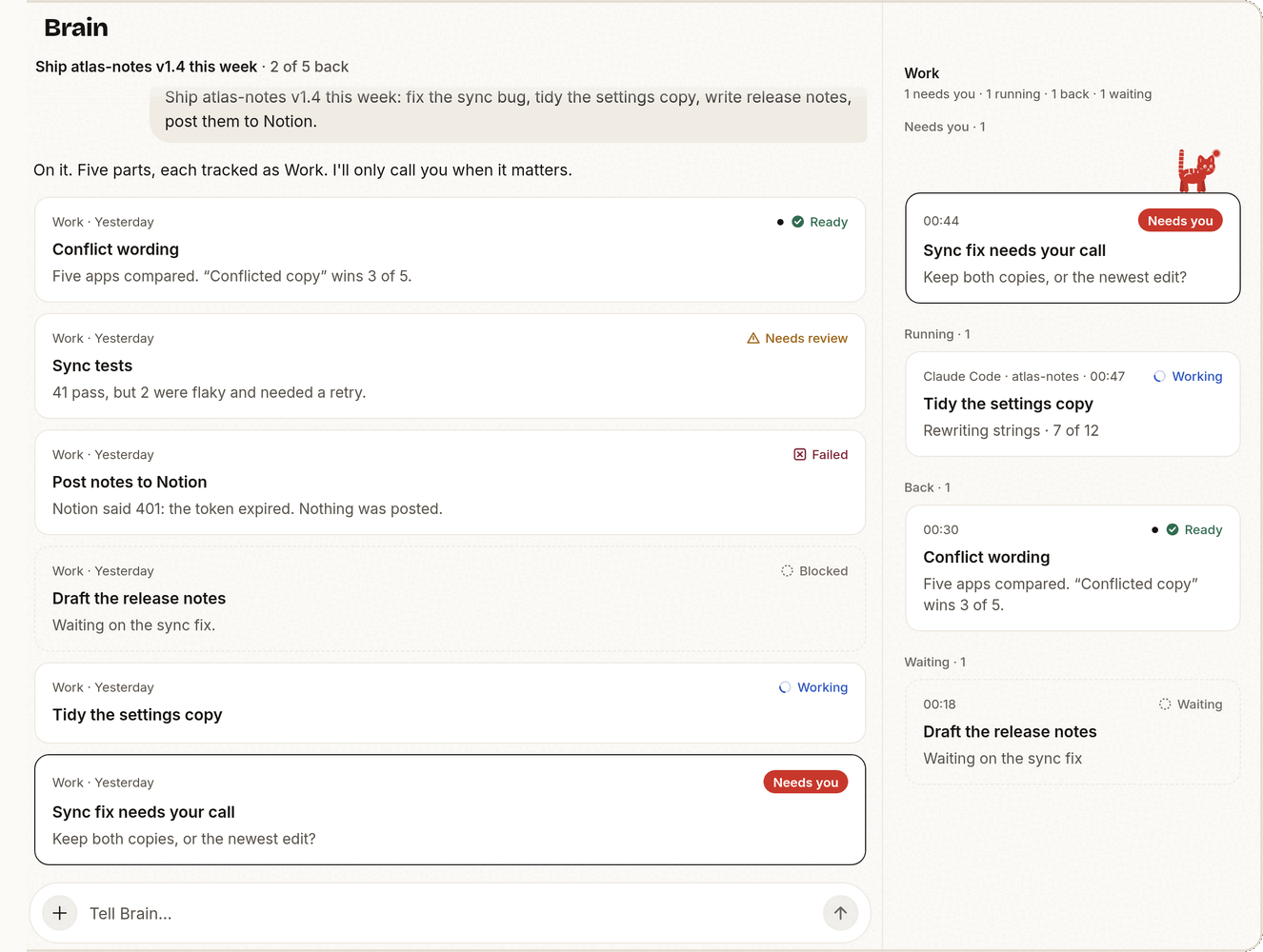
Demo data.
The goal line. At the top of the Work column (wide screens) and the Work sheet (phones), with how much has come back: "Ship atlas-notes v1.4 this week · 2 of 5 back". Brain sets it; a new chat starts without one. The app stops showing it once it is no longer current: all its Work is done, everything has been back for 30 minutes, or nothing in it has moved for 12 hours.
Slips in the conversation. Each Work appears as one slip: agent, project and time, its state, its title and one line of result. When a Work reports again, its slip moves down to that moment instead of piling up copies.
| Mark | State |
|---|---|
| Check | Ready: done, or back and accepted |
| Spinning arc | Running, or Brain is reviewing the result |
| Red "Needs you" pill, dark outline | Waiting for your decision |
| Open triangle | Needs review, for example the Worker stopped reporting |
| Crossed box, with the cause | Failed |
| Dashed ring | Blocked or waiting on something else |
Red always means "needs you", never "failed".
All current Work in one place. The cat's line at the end of the conversation says what is out: "3 Workers running", "Brought something back". On a phone the chat gets the whole screen: tap that line, or ⋯ → Work, to open the list as a sheet, with all the counts in one line at its top. On a wide screen the list is the Work column beside the chat, and tapping the cat's line scrolls the column to the Work it counts. Both group Work by what it asks of you: Needs you, Running, Back, Waiting. Closed Work leaves the list. When Work needs you, "Brain" gets a red dot (like "Sessions" does for a Session), and the cat sits on that Work's slip in the conversation.
The cat. Tap it and Brain answers. It also plays when you address it: tap twice and a standing cat does a happy hop; hold it to pet it (it purrs, with a light tap on the phone); hold and drag to pick it up, and it springs back to its spot. It never moves on its own beyond showing Brain's state, stays still while you type, and with Reduce Motion on it keeps only the haptics.
Connection. When the app can't reach your computer, the menu (☰) gets a dot and the menu's last line says why. Nothing is pinned over the chat. If you press Send while offline, the composer says the message was not sent and keeps it for you.
Folded steps. The searches, reads and commands Brain runs in a turn fold into one "Worked · N steps" row. Tap it to see them. Session chats keep every row.
Background tasks. When a Claude Code subagent, background command or monitor reports back, the chat shows a task card with its status, duration, tool uses and tokens. Tap it for the full result.
Act on a slip#
Every slip carries its next step:
| The Work | You can |
|---|---|
| Asks a question | Tap one of Brain's answers ("Keep both"), reply in your own words, snooze it until tomorrow morning, or say it is not needed anymore |
| Came back | Accept it, which closes it, or Ask Brain about this, which opens Brain's composer with the Work quoted |
| Is running | Open its Worker, ask Brain about it, or Stop it (after a confirmation; the Worker closes and the Work is cancelled) |
| Failed | Retry it through Brain, or dismiss it |
| Ended with no result | "Outcome unknown": ask Brain to check, or close it |
Your reply goes to Brain as a message about that Work, and the slip says "With Brain" until Brain acts on it. A result that has waited more than a day for a decision moves to Needs you, so nothing sits there forever.
Brain asks with buttons by setting a question on the Work:
mewla brain work update -id <work-id> -status waiting \
  -question "Keep both copies, or the newest edit?" -choice "Keep both" -choice "Newest wins"
Who decides that Work is done#
Brain, after it reviews the result, or you. A Worker saying "done", a process exiting or a pane going quiet is evidence, not completion. When a Worker reports, Brain reads the result and accepts the Work, sends a follow-up or tries again. A Worker that disappears leaves its Work marked for review.
When you close Work from a slip, that is final: Brain does not reopen it. The same from the computer:
mewla brain work list --json                 # open Work
mewla brain work list --json -all -full      # include closed Work and objectives
mewla brain work list --json -id <work-id>   # one Work with its history
mewla brain work update -id <work-id> -status done
The pet#
Brain is a pet, a small cat by default. It is on screen once, and what it does is Brain's real state:
| Pet | Brain |
|---|---|
| Asleep in the seal | Idle |
| Hops out of the seal | The app is starting, connecting or loading the conversation |
| Walking | Working on your message |
| Peeking over the seal, on a slip | That Work needs you |
| Sitting, watching | Workers hold delegated Work |
| A happy hop | A result is waiting for you to read |
| Asleep in a grey seal | Your computer is offline |
| Empty seal | No computer is paired yet |
Tap it and it answers: idle, it says how things stand ("All quiet. 2 running, nothing needs you."); when Work needs you, it opens the first one; while Brain works, it says what Brain is doing; offline, it tries to reconnect. It holds still when your device asks for reduced motion.
Pick another pet in Settings → Pet: ten to choose from, and the choice stays on that device (the phone and the web UI each keep their own).
Worker routing#
Brain picks the agent, model and reasoning level for every Worker. Before each
launch it reads routing.md in its workspace, a few lines of Markdown such as
"use Codex with high reasoning for refactors". It rewrites a line when you
state a preference, when a new model appears or when a choice went badly.
Mewla never parses the file and upgrades never overwrite it.
A Worker launch looks like this:
mewla worker spawn -name "Fix flaky test" -executor claude \
  -model claude-opus-5-5 -reasoning high -cwd /path/to/repo -prompt "..."
Without -executor, the Worker uses Brain's own agent. Mewla maps -model and
-reasoning to each client's flags:
| Executor | -model becomes |
-reasoning becomes |
|---|---|---|
codex |
--model |
-c model_reasoning_effort=...: none, minimal, low, medium, high, xhigh, max, ultra |
claude |
--model |
--effort: low, medium, high, xhigh, max |
pi |
--model provider/id |
--thinking: off, minimal, low, medium, high, xhigh, max |
grok |
--model |
Not supported |
agent (Cursor) |
--model |
Not supported |
opencode |
--model provider/model |
Not supported |
A launch value replaces the same flag in the configured command. An executor
that cannot take an option fails the launch with an explanation rather than
dropping it; empty values keep the client's default. Name executors after
clients, not capabilities: no codex-high.
Watch and steer Workers#
Workers are in Sessions like any other Session: open one, read it as Chat or Terminal, type into it. From the computer:
mewla worker list --json
mewla worker status -id <session-id> --json
mewla worker capture -id <session-id> --json      # transcript
mewla worker send -id <session-id> --work-id <work-id> -text "Also update the tests"
mewla worker receipt -id <session-id> --work-id <work-id> --turn-id <turn>
mewla worker close -id <session-id>
--work-id delivers the follow-up as part of that Work. If a send's outcome is
unknown, the input may still have arrived; mewla worker receipt checks
without sending it again. Closing a Worker, or accepting its Work, stops the
processes that Worker started. Your own Sessions and Brain are never cleaned
up this way.
Brain's workspace#
Brain keeps plain-file notes under ~/.mewla/brain; mewla brain workspace
prints the path. Browse workspace in Brain's ⋯ menu opens them in the app.
| File | Holds |
|---|---|
routing.md |
Which agent, model and reasoning for which kind of task |
profile.md |
Your background and preferences |
memory.md |
Durable facts and decisions |
current.md |
A short handoff of the active work |
AGENTS.md |
Brain's standing instructions, partly managed by Mewla |
worklog/ |
Brain's reports and handoffs |
Video and audio files in the workspace play in place, through the same stream as a file in a reply; that needs Brain's agent to be running.
Edit them freely. Mewla refreshes only its own marked blocks in AGENTS.md.
mewla brain gc reports when a note has outgrown its size budget.
Switch Brain's agent#
mewla brain executors --json
mewla brain use claude
The thread and its history move with Brain. In the app, Brain's ⋯ menu has Switch executor, New chat (a fresh thread), Open terminal (Brain's own Session) and Browse workspace.